
Tracking Shared Expenses With a Partner
Add two columns to your shared tab — who paid, and what share each owes — then let a running balance carry the difference forward. At any moment, one number tells you who is ahead and by how much. Settle it with a single transfer once a month.
The mistake most couples make isn't the maths. It's reimbursing each purchase as it happens, which turns every grocery run into a small transaction and every month into forty of them.
Decide the split first
This is the conversation, and the spreadsheet is just where the answer lives. Three models cover almost everyone:
- 50/50. Simplest. Fine when incomes are broadly similar. Everything shared is halved.
- Proportional to income. Each person covers the share of joint costs matching their share of joint income — someone earning 60% of the household total pays 60% of the shared bills. Generally fairer when incomes differ substantially, and it costs you one extra column.
- Yours, mine, ours. A fixed amount each into shared costs, everything above that is personal and untracked. The least granular and often the most durable.
Any of these works. What doesn't work is leaving it implicit and letting the spreadsheet imply an answer neither of you agreed to.
The two columns
Start from a normal transactions tab — the same one from the Google Sheets budget build — and add Paid by and Share:
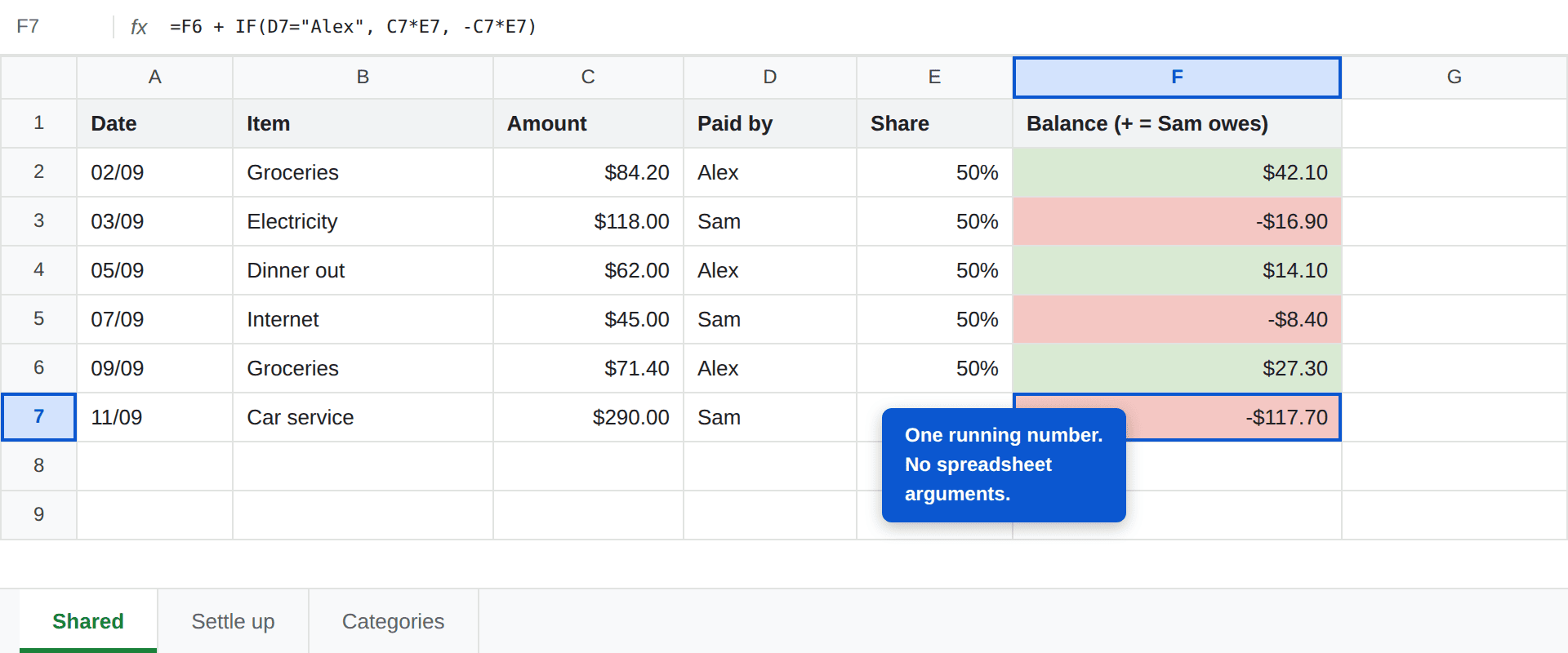
- Paid by — a dropdown with two names. A dropdown, not free text, for exactly the reasons in why SUMIFS stops adding up: "Alex" and "alex " are different people as far as a formula is concerned.
- Share — the proportion the other person owes. 50% for an even split; 60% or 40% for proportional. Keeping it per-row means a one-off uneven split needs no new machinery.
The running balance
One formula, dragged down:
=F6 + IF(D7="Alex", C7*E7, -C7*E7)
Read it as: take the previous balance, and if Alex paid, the other person now owes their share more; if Sam paid, the balance swings the other way. Positive means Sam owes Alex, negative means the reverse. Conditional formatting on that column does the rest — you stop reading numbers and start reading colour.
The value of a running balance rather than a per-transaction one is that it absorbs asymmetry. One person paying for a $290 car service doesn't need an immediate transfer; it just moves the number.
Run your numbers
Budget template
Add Paid by and Share to the Transactions tab and it works as a joint sheet.
Make a copy →Budget Calculator
Split joint income 50/30/20 before you set shared category budgets.
Open calculator →Settling up
A small tab that reduces the month to one sentence:
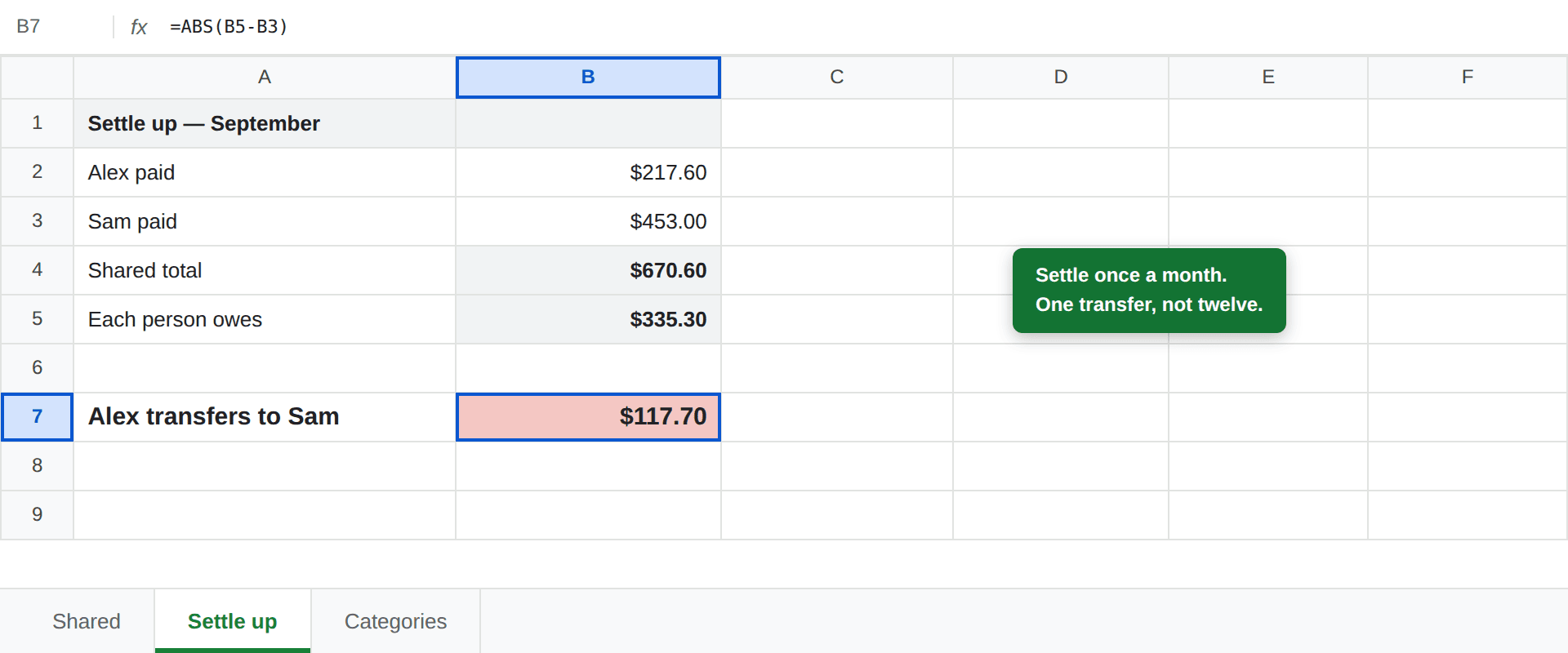
Total what each person paid with SUMIF on the Paid by column, halve the shared total for what each owes, and the difference is the transfer. Once a month, on a fixed date. Not per transaction — that generates constant small payments and wastes the balance column entirely.
Sharing it properly
Three settings worth getting right on day one:
- Give edit access, not view. Share → add their Google account → Editor. A sheet only one person can update becomes a sheet only one person maintains, and that is how joint budgets quietly become one person's chore.
- Both use the mobile app. The entire system depends on logging things near the moment they happen. If one of you has to wait until you're at a laptop, the sheet is already out of date.
- Know that version history exists. File → Version history shows who changed which cell and when. It's rarely needed, but "the number changed and neither of us knows why" is a genuinely corrosive argument, and this ends it in thirty seconds.
This is also the honest reason to use Sheets over Excel here. Two people editing the same file simultaneously is native, free and instant — see the full Excel vs Google Sheets comparison for where that trade-off goes the other way.
What to keep out of it
The shared sheet should contain shared costs. Not everything.
Agree an amount each that is personal and untracked — the same figure for both, regardless of who earns more. It buys whatever it buys, and the other person doesn't get a vote.
This sounds like a softness in the system and it is the opposite. A budget that requires justifying a coffee to another adult does not survive contact with a real year. The accuracy you give up is trivial; the resentment you avoid is not.
Personal savings goals are worth keeping separate too — each of you can run your own sinking funds without the other tracking the balance.
Frequently asked questions
How do you split expenses with a partner in a spreadsheet?
Add two columns to your shared transactions tab: who paid, and what share each person owes. A running balance column then carries the difference forward, so at any moment one number tells you who is ahead and by how much. Settle that number with a single transfer once a month rather than reimbursing each purchase.
Should couples split bills 50/50 or by income?
Both work; what matters is agreeing before you build the sheet. A 50/50 split is simplest and fine when incomes are similar. Proportional splitting — each person covers the share of shared costs that matches their share of joint income — is generally fairer when incomes differ substantially, and it is one column change in the spreadsheet either way.
Can two people edit the same Google Sheet at once?
Yes, and this is the main reason to use Google Sheets rather than a local Excel file for joint money. Both people can log expenses simultaneously from phones or laptops, edits appear immediately, and version history records who changed what — which settles most disagreements before they start.
Should we put everything in the shared sheet?
No. Track shared costs only, and keep an agreed amount of personal spending money outside the sheet entirely. A system that requires justifying every coffee to another adult tends not to survive, and the small amount of tracking accuracy you lose is worth far less than the arrangement lasting.
How often should we settle up?
Monthly for most couples. Settling per transaction generates constant small transfers and defeats the point of the running balance; settling quarterly lets the number grow large enough to sting. Once a month, on a fixed date, keeps it to a single transfer and a two-minute conversation.