
The Best Budget Categories
Eight to fifteen categories. Twelve is a good default. Below eight, the totals stop telling you anything you can act on. Above fifteen, you spend more effort filing each purchase than you gain from knowing where it went — and that friction, not laziness, is what kills most budgets.
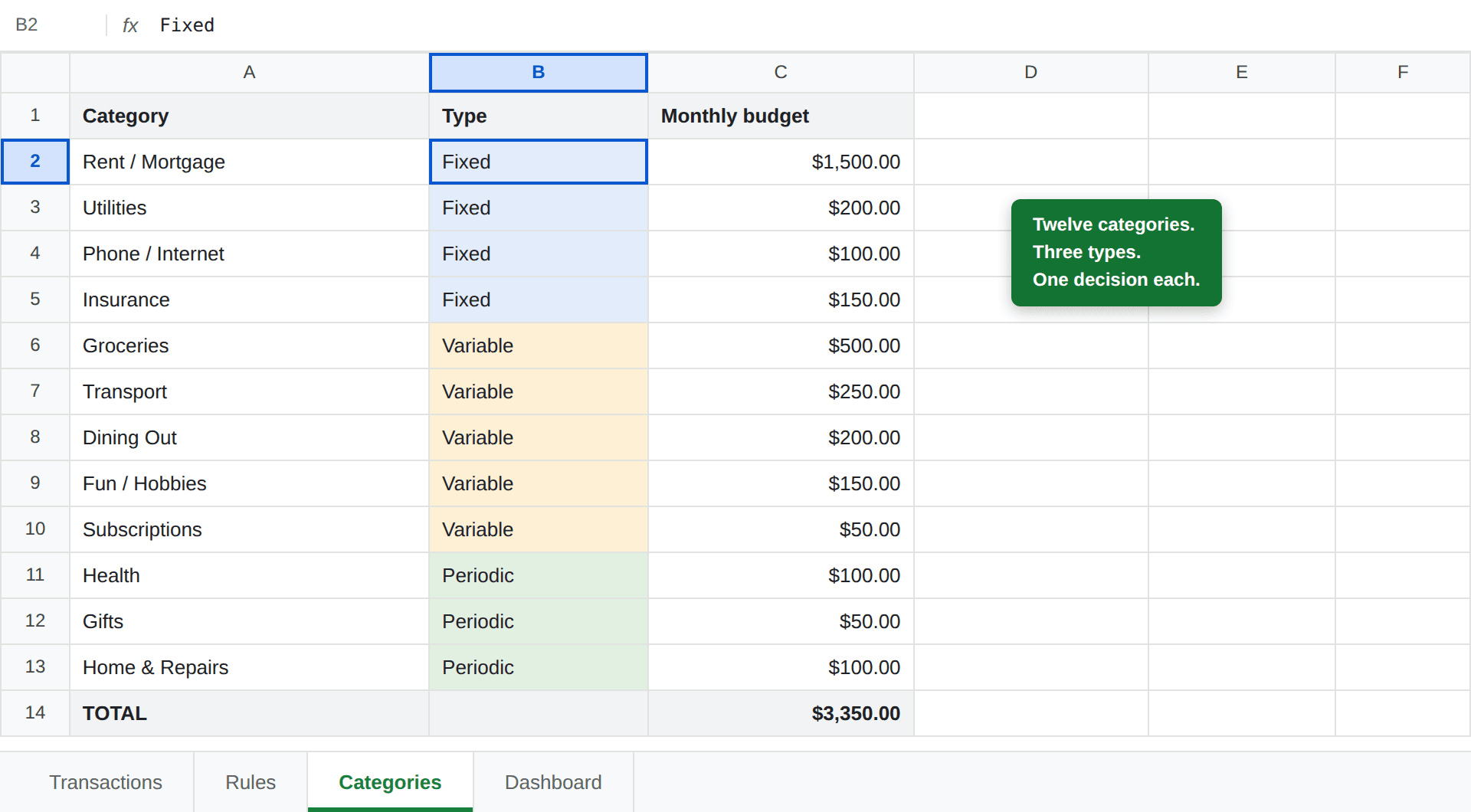
Here is a set that works for most households, grouped by how the money behaves:
Why too many is the common failure
Nobody abandons a budget because it had too few categories. They abandon it because every purchase became a small decision:
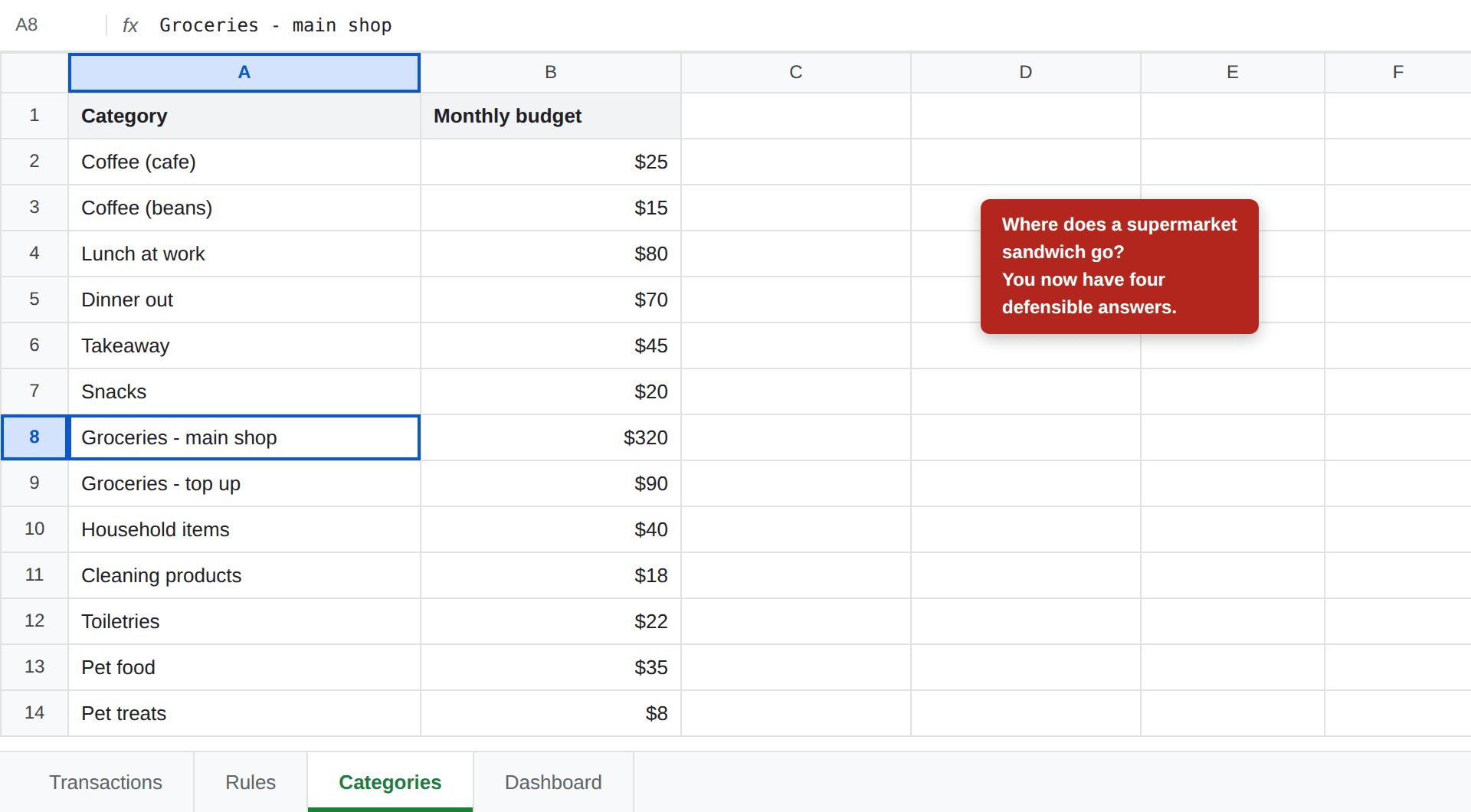
Every category you add is a question you have to answer at the till, forever. Coffee beans bought in a supermarket — Groceries, or Coffee? A sandwich at the petrol station — Groceries, Lunch, or Transport? There's no right answer, which means you'll answer it differently each time, and your totals quietly become fiction.
Worse, the answers stop mattering. A category budgeted at $8 a month cannot be overspent in any way that changes your life. You've added permanent friction in exchange for information you will never act on.
Why too few fails differently
The opposite error is quieter. Three categories — Bills, Food, Other — produce a budget that's effortless to maintain and useless to read.
When "Other: $1,400" is over budget, you have learned nothing. You can't cut Other. The whole point of categories is to convert a number you feel vaguely bad about into a decision you can actually make, and that requires the line to name something specific enough to change.
Eight is roughly where that starts working.
Group by behaviour, not by shop
The Type column in the screenshot above does more work than it looks like. Sorting categories by how the money behaves tells you which lines are even available to you:
- Fixed — rent, utilities, insurance, phone. Roughly the same every month. You can only change these with a big decision (move, switch provider), never with willpower on a Tuesday.
- Variable — groceries, transport, dining out, fun. These move with daily choices. This is the only group your behaviour changes this month, which is why over-splitting here hurts most and under-splitting here costs you the most information.
- Periodic — health, gifts, repairs. Real but irregular. Budget a monthly average and expect most months to sit under it.
When a budget is over, the answer is almost always in the Variable group. Grouping this way means you look there first instead of scanning twelve lines.
Run your numbers
Budget template
Comes with a Categories tab already set up — rename them to yours.
Make a copy →Budget Calculator
Split your income 50/30/20 before assigning the category budgets.
Open calculator →The test a category has to pass
One question decides whether a line earns its place:
Would I do something differently because of this number?
"Dining Out: $310, budget $200" — yes. That changes next weekend. "Pet treats: $11, budget $8" — no. Nothing follows from it.
Apply the test honestly and most people delete a third of their categories. The ones that survive are the ones where you have both the information and the ability to act on it.
A useful corollary: if two categories always move together, they're one category. If Coffee and Snacks rise in the same weeks for the same reason, merging them loses nothing and saves you a decision.
Purchases that fit two categories
Pick a default once, write it down, and never re-decide. The supermarket that also sells petrol goes to Groceries every time — or Transport every time. Which one you choose barely matters; consistency is the entire value.
This is worth being blunt about, because it's where perfectionism does real damage. A budget that is 95% accurate and takes ten seconds a day beats one that is 100% accurate and gets abandoned in March. The 5% you gave up was never going to change a decision.
If you'd rather not make the call at all, let a formula make it: categorising transactions automatically means a keyword rule decides, consistently, forever. Ambiguity stops being your problem the moment it stops being a human judgement.
When to split one later
Start merged and split only when you've earned the right to:
- You've looked at the line twice and wanted more detail both times. Not once — wanting detail once is curiosity, wanting it twice is a pattern.
- The split would change a decision. Separating Groceries from Dining Out qualifies, because only one of them is genuinely discretionary. Separating two kinds of coffee does not.
- The new category is big enough to matter. As a rough filter, if it wouldn't reach about 5% of your spending, leave it inside its parent.
Splitting a category mid-year does break your comparisons — last month's Groceries included what's now Dining Out. That's survivable, and it's another argument for starting small: merging later is clean, splitting later is not.
Once the list is settled, set a budget against each one and let the dashboard do the rest — that's the standard Google Sheets budget build, and the categories you just chose are the spine of it.
Frequently asked questions
How many budget categories should I have?
Between eight and fifteen for most households. Below eight the totals stop being actionable — a single Shopping line of $1,400 tells you nothing you can act on. Above fifteen you spend more effort deciding where each purchase belongs than you save by knowing, and that friction is what makes people abandon a budget.
What are the most common budget categories?
A twelve-category starter set covers most households: Rent or Mortgage, Utilities, Phone and Internet, Insurance, Groceries, Transport, Dining Out, Fun, Subscriptions, Health, Gifts, and Home and Repairs. Adjust the names to match how you actually spend rather than copying a list verbatim.
Should I split Groceries and Dining Out?
Yes — this is one of the few splits that consistently earns its place. They behave differently: groceries are close to a fixed cost you can only trim so far, while dining out is genuinely discretionary. Seeing them merged hides the only one of the two you can realistically change.
What should I do with purchases that fit two categories?
Pick a default once and never re-decide. A supermarket that also sells petrol goes to Groceries every time, or Transport every time — it does not matter which, as long as it is consistent. The cost of deciding repeatedly is far higher than the small inaccuracy of a fixed rule.
Do sinking funds need their own categories?
They are a separate mechanism, not extra spending categories. A sinking fund saves toward a known future cost, so the monthly contribution is one line in your budget while the fund itself is tracked separately. Adding a category for every irregular expense is the fastest route to a thirty-category sheet nobody maintains.